Cloudflare Workers AI & AI Gateway
Overview
The document covers the use of various Cloudflare AI services within Qarbine. There are 2 primary use cases:
- Workers AI for completions and embeddings.
- AI Gateway which proxies to other popular AI services such as OpenAI.
The first scenario maps to configuring a Qarbine AI Assistant for the Cloudflare Workers AI interface. The second generally changes the AI service endpoint to be a Cloudflare one “in front of” the standard AI service. It provides AI service security, visibility, and other features..
AI Assistant Configuration
Overview
Cloudflare Workers AI provides the endpoints for embeddings and completions (Q&A text generation). The following information is required for configuring a Cloudflare Work AI based AI assistant.
- Cloudflare account,
- API token (configured as the “apiKey”),
- embedding model, and
- completion model.
For details on creating an API token see https://developers.cloudflare.com/fundamentals/api/get-started/create-token/
As part of that process, include the following permission for the token.

Configuration Entry
Information on available models can be found at
https://developers.cloudflare.com/workers-ai/models/
Below is the AI Assistant entry pattern for a Cloudflare Workers AI service.
{
"type": "Cloudflare",
"alias" : "myCloudflare",
"account" : "1234567890ABC",
"apiKey" : "sk-******",
"model1": “xxx”,  ← The completion default is "@cf/meta/llama-2-7b-chat-int8".
"model2": “yyy”,  ← The embedding default is "@cf/baai/bge-small-en-v1.5".
}
See the main Qarbine AI Assistant configuration information for more details.
AI Gateway Configuration
Overview
Using the Cloudflare AI Gateway generally requires changing the AI service’s endpoint to be a Cloudflare one “in front of” the standard AI service. The general information needed to use the AI Gateway includes:
- the AI service’s API token,
- the model identifier,
- your Cloudflare account identifier,
- the Cloudflare AI Gateway identifier, and
- an optional Cloudflare API token (highly recommended).
For general AI Gateway information see
https://developers.cloudflare.com/ai-gateway/
and for configuration information see
https://developers.cloudflare.com/ai-gateway/configuration/
There are examples for various AI services described further below. In the case of accessing Open AI, the base URL changes from
to
https://gateway.ai.cloudflare.com/v1/ACCOUNT/GATEWAY/openai
It is recommended that you use an authenticated gateway which adds security by requiring a valid authorization token for each request. With Authenticated Gateway enabled, only requests with the correct token are processed. In this configuration the Cloudflare API token is sent to the AI Gateway via an HTTP header of the form
"cf-aig-authorization": `Bearer {token}`
For more information on authentication see https://developers.cloudflare.com/ai-gateway/configuration/authentication/
Obtaining AI Gateway Token
Steps to create the authentication token are described at
https://developers.cloudflare.com/ai-gateway/configuration/authentication/#setting-up-authenticated-gateway-using-the-dashboard
They are summarized here.
Sign on to your account at https://dash.cloudflare.com/.
Next, choose the highlighted option below.

You can determine the authentication state by reviewing your AI Gateway listing

In this example “my-ai-gateway” is an AI gateway identifier. Click on the gateway of interest and then the Settings tab.

Click the highlighted toggle.

A dialog is presented..
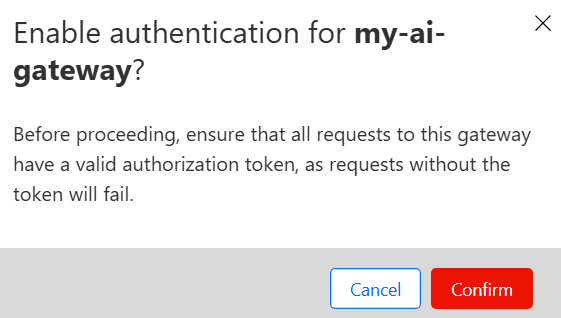
Click “Confirm”. The right side toggle is updated.

Click

Click the button shown below.

Name the token.
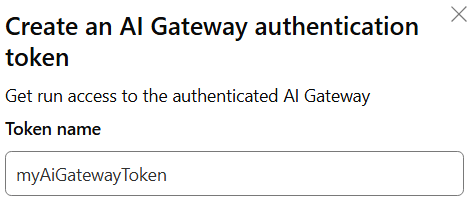
Set the permissions.

Adjust the accounts as desired.

Click

In the dialog presented click

Paste the token into a temporary location.
Click

Click the highlighted button to copy the account ID.

Common Configuration
To set the authentication header include the following line in the AI Assistants configuration
The baseURI1value is used for completions and the baseURI2 used for embeddings. The default baseURI2 is whatever the value is for baseURI1. Some AI services only support completions, while others only embeddings.
A sample error with an incorrect Cloudflare API token is shown below.
"DataSource- Cloudflare. completion() error doQueryCompletionUsingOpenAI 401 Unauthorized accessing https://gateway.ai.cloudflare.com/v1/87c054/my-ai-gateway/openai/v1/chat/completions"
In general the baseURI1 (base-you-are-eye-one) AI Assistant entry setting is adjusted to a Cloudflare endpoint.
AWS Bedrock
Use a baseURI1 of
https://gateway.ai.cloudflare.com/v1/ACCOUNT/GATEWAY/aws-bedrock
Anthropic
Use a baseURI1 of
https://gateway.ai.cloudflare.com/v1/ACCOUNT/GATEWAY/anthropic
Azure Open AI
Use a baseURI1 of
https://gateway.ai.cloudflare.com/v1/ACCOUNT/GATEWAY/azure-openai
Cohere
Use a baseURI1 of
https://gateway.ai.cloudflare.com/v1/ACCOUNT/GATEWAY/cohere
DeepSeek
Use a baseURI1 of
https://gateway.ai.cloudflare.com/v1/ACCOUNT/GATEWAY/deepseek
Google Vertex AI
Use a baseURI1 of
https://gateway.ai.cloudflare.com/v1/ACCOUNT/GATEWAY/google-vertex-ai
Hugging Face
Use a baseURI1 of
https://gateway.ai.cloudflare.com/v1/ACCOUNT/GATEWAY/huggingface
Mistral
Use a baseURI1 of
https://gateway.ai.cloudflare.com/v1/ACCOUNT/GATEWAY/mistral
Open AI
Use a baseURI1 of
https://gateway.ai.cloudflare.com/v1/ACCOUNT/GATEWAY/openai
Perplexity AI
Use a baseURI1 of
https://gateway.ai.cloudflare.com/v1/ACCOUNT/GATEWAY/perplexity-ai